How to get DeFi yield benchmarks

Benchmark rates tell you what the average yield environment looks like for stablecoins (USD) or ETH on a given chain. They're the baseline you compare individual vaults against, and the input you'd hand to an agent making a "should I rotate?" decision.
What's benchmarked
A benchmark represents the TVL-weighted average APY across the five largest vaults in a given denomination and network, each with at least $1M in TVL.
Vaults.fyi publishes separate USD and ETH benchmarks for Ethereum mainnet and every supported L2:
- USD benchmark: a weighted-average yield across the largest stablecoin yield markets on a given network.
- ETH benchmark: the equivalent for ETH yield, spanning the largest LSTs and lending markets.
- Both are computed daily, with 1-day, 7-day, and 30-day rolling averages
Fine more detail on our methodology here. Coverage spans Ethereum mainnet, Base, Arbitrum, Optimism, Polygon, and other supported networks.
Where to get benchmark data
- If you just want to see benchmark rates, the analytics page at app.vaults.fyi/analytics has them charted out for every supported network.
- If you want to do further analysis, build benchmark rates into your own product, or feed them into an agent, the API and MCP server expose the same data programmatically. Here's how to pull them.
Using the API
Let's run through an example, showing how to get USD benchmark data on Ethereum (mainnet).
First, we can get the current benchmark values:
curl -H "x-api-key: $VAULTS_API_KEY" \
  "https://api.vaults.fyi/v2/benchmarks/mainnet?code=usd"
Response:
{
  "apy": {
    "1day":  { "base": 0.0346, "reward": 0, "total": 0.0346 },
    "7day":  { "base": 0.0354, "reward": 0, "total": 0.0354 },
    "30day": { "base": 0.0396, "reward": 0, "total": 0.0396 }
  },
  "timestamp": 1778198400
}
If we want to show historical rates, we can get benchmarks with a date range:
curl -H "x-api-key: $VAULTS_API_KEY" \
  "https://api.vaults.fyi/v2/historical-benchmarks/mainnet?code=usd&fromTimestamp=1771142400&toTimestamp=1778630400&perPage=500"
Example: Get USD benchmark rates on mainnet
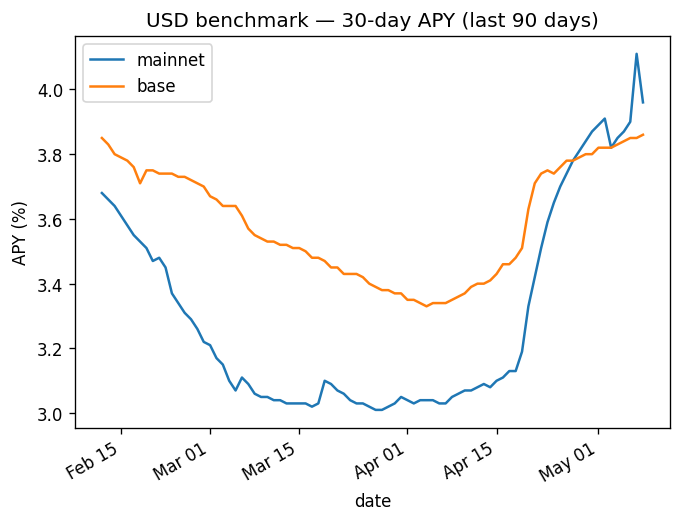
The response is a data array of the same per-day shape. Use fromTimestamp and toTimestamp (Unix seconds) to scope the window; perPage goes up to 500.
Swap mainnet for base, arbitrum, optimism, etc. to get other networks. Swap usd for eth to get the ETH benchmark.
Using the MCP server
If you'd rather query benchmarks from a chat interface (Claude Desktop, Cursor, your own agent), the same data is available via vaults.fyi's MCP server.
We do one quick configuration, then ask in natural language. Follow the our quickstart guide, outlined below.


1) Claude Desktop config (~/Library/Application Support/Claude/claude_desktop_config.json on macOS):
{
  "mcpServers": {
    "vaultsfyi": {
      "url": "https://mcp.vaults.fyi/mcp",
      "headers": {
        "Authorization": "Bearer YOUR_VAULTS_API_KEY"
      }
    }
  }
}
You'll then need to restart your Claude session after configuration.
2) You can ask things like:
chart the USD benchmark 30d APY for Ethereum mainnet since Feb 1 2026
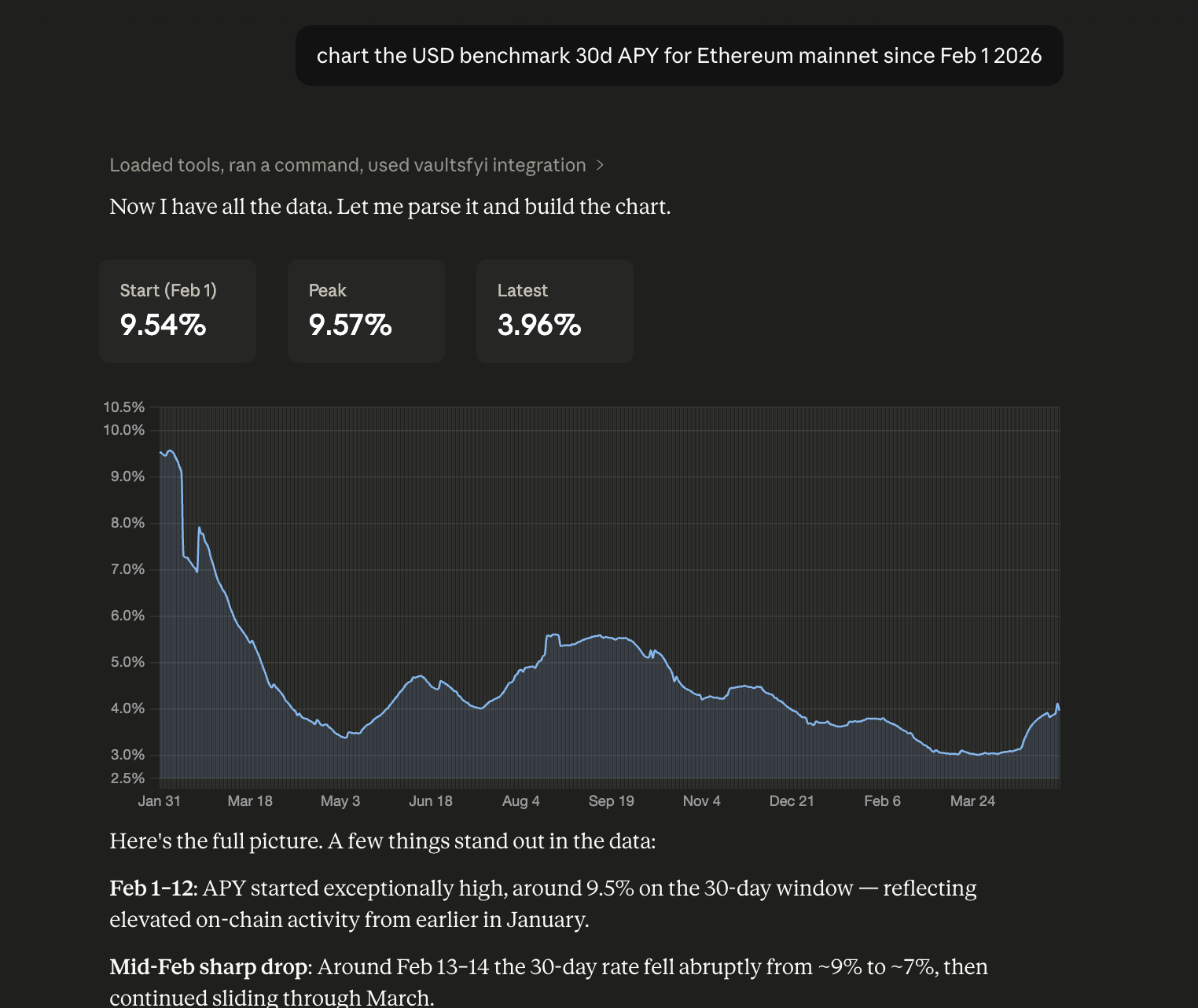
The same works for current rates, or for ETH rates, across the 20+ networks we cover. Try "Pull 30d ETH benchmark rates for Arbitrum, covering the last 180 days." The MCP returns the same apy.{1day, 7day, 30day} structure as the API, so agents can read it directly without any field translation.
What to do with it
A few practical applications:
- Rebalance threshold: only move funds when your candidate vault beats the network benchmark by N basis points (after gas)
- Honest performance tracking: "up 4.0% APY" is meaningless if the benchmark is 4.0%. Track your portfolio's effective yield against the benchmark and surface underperformance.
- Agent decision input: pass the current and 30-day benchmark into a yield-rotation agent's context so it has a sense of what counts as "above average" today
- Strategy backtesting: combine
historical-benchmarkswithvault_apy_historyto compute alpha vs. the benchmark for a given vault over time
Have fun building.
Reach out to us @vaultsfyi on X if you have any questions or feedback.